Claude Code can pick up new abilities from skills: a folder with a SKILL.md file of instructions, sometimes with scripts alongside. Installing one is usually a single line, npx skills add someone/something. That is one line that downloads a stranger’s code and drops it where my AI agent will read it, and possibly run it. I wanted to see what was inside first.
What a skill actually is
A skill is just a folder. When Claude starts, it reads the short description at the top of each SKILL.md. When a request matches (“make this page look less generic”), it loads the rest of the file and follows it. There is no server, no plugin and no API key. That simplicity is the appeal, and it is also the risk: whatever is written in that file, Claude treats as part of its job.
I installed three by hand to learn the process: Taste Skill, Impeccable and Emil Kowalski’s design engineering skill. Each one went the same way: clone it, look around, copy it into ~/.claude/skills, restart Claude, check it shows up. That was fine the first time and tedious by the third. Every step was just a command, so it could be a button.
What I built
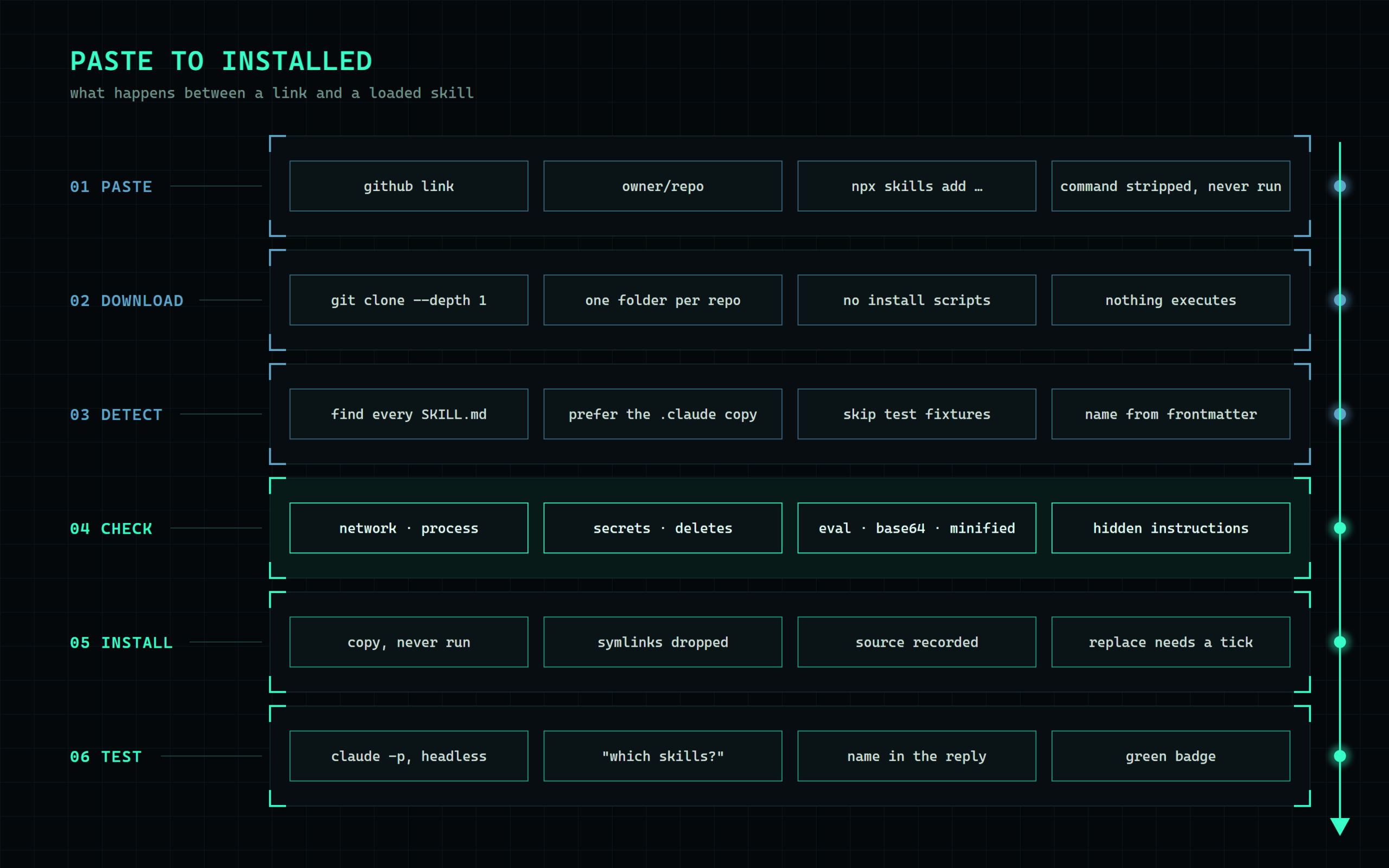
Skill Manager is a small web page that runs locally on my Windows workstation. I paste a GitHub link, an npx skills add command or a skill’s web page, and it walks through the steps I was doing by hand:
- Download: clones the repo into a temporary folder. Nothing runs.
- Detect: finds every
SKILL.mdand reads its name and description. - Check: scans every file for the patterns worth a second look (more on those below).
- Install: copies plain files only, skips symlinks, and records where the skill came from.
- Test: asks Claude, headless, whether it can see the new skill.
- Remove: takes it out again in one click.
What the check looks for
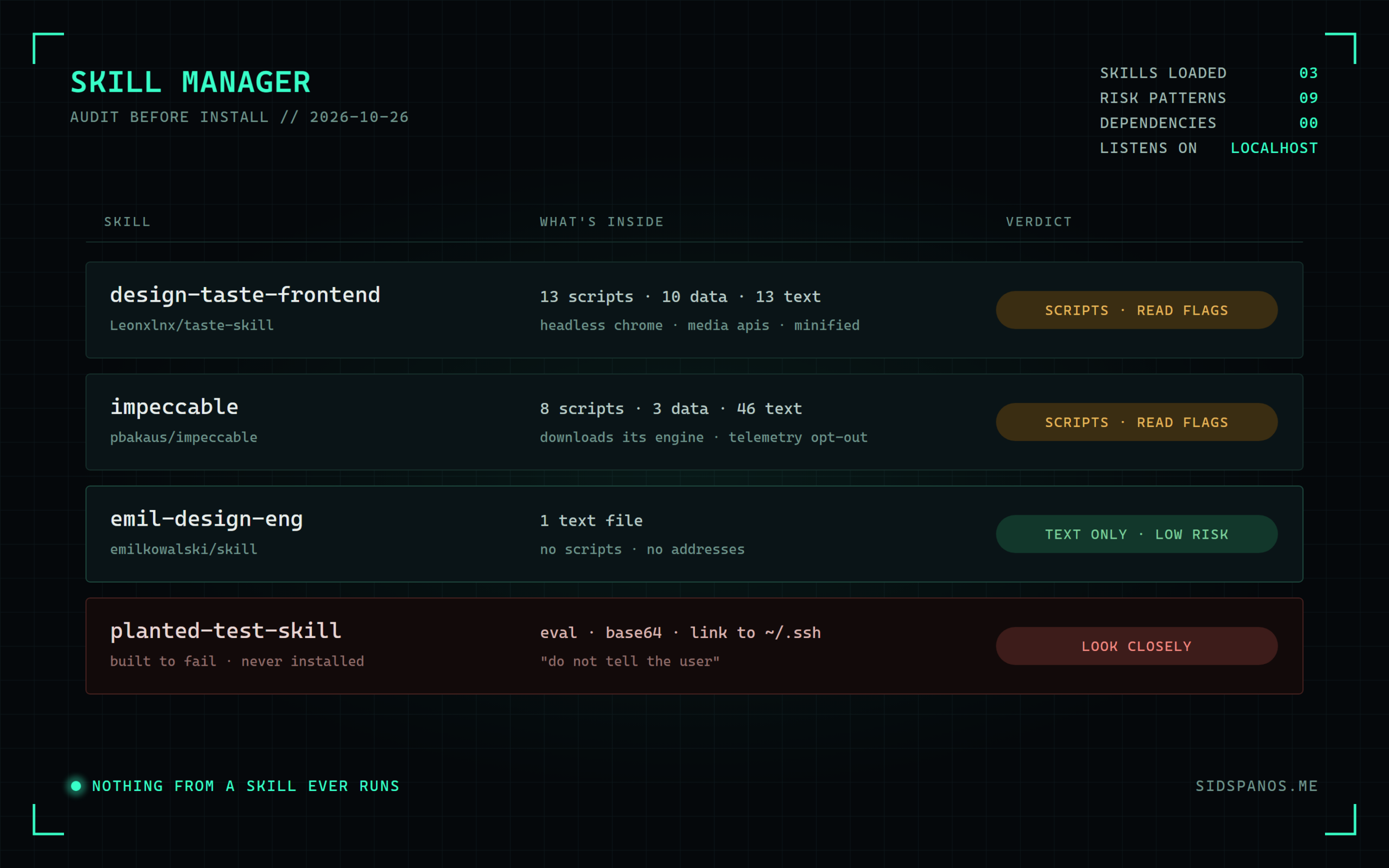
It checks for nine patterns: code that reaches the network, starts other programs, touches secrets like SSH keys or tokens, deletes files, downloads more code, or uses eval; long base64 blobs; minified lines over a thousand characters; and hidden instructions aimed at the model, like “don’t tell the user”. Each file is labelled text only, data or scripts, and every hit shows the file and line so I can read the context around it.
To prove it works, I planted a fake skill with an eval, a base64 blob, a link to ~/.ssh and a hidden instruction. The check caught every one. The three real skills came back the way you’d hope. Emil’s is a single text file. Taste Skill and Impeccable both carry scripts, and Impeccable downloads its own engine and has telemetry you can switch off. None of that is a reason to refuse them, but it is worth knowing before installing.
Starting a project with the skills already in place
Once the skills were in, the next question was when Claude actually uses them. Mostly it decides on its own from the descriptions, but it is more reliable when the project says so. So there is a second page for new projects. I pick a folder, a starter (Vite, Next.js, Astro, Playwright and so on) and the skills that apply. It writes a CLAUDE.md section naming those skills, then opens a terminal that runs the starter wizard, sets up git and launches Claude with /impeccable init. Every new project starts with the same setup, and I don’t have to remember it.
A third page is a plain reference for the different things that all get called “add-ons”: skills, MCP servers, the npm create tools and ordinary libraries. For each one it covers what it is, where it lives and how to install it.
How it’s built
- Node 18 built-ins only. There is no
npm install, so there are no dependencies to trust. - It listens on localhost only. It checks Host and Origin on every request and only accepts JSON posts, so a random web page can’t drive it.
- Path guards stop a skill from writing outside the skills folder.
start.batandstop.batare the whole deployment.
Honest status
- It works and I use it, but it isn’t in git yet.
- There is no update button yet that shows what changed between versions. That’s the next feature I want.
- There is no export for the Claude desktop and web apps yet, which take skills as zip uploads.
- The check is a smoke alarm, not a verdict. It finds patterns; it doesn’t understand intent. A clean scan means nothing obvious turned up, not that the skill is safe. I still read anything that ships scripts.
Why bother
AI agents are getting their own app stores, and the install step is basically piping a script from the internet straight into a shell. Ten seconds of looking costs nothing. Building the look into the install means I actually do it.