For a week NetAlertX, my device monitor, kept showing ten devices it couldn’t name. They sat next to each other in the address range, and every one had a MAC address starting with 02:42. Ten unknown devices on a home network is either nothing or a very bad day, and I wanted to know which.
What the ten unknowns were
It was nothing. 02:42 is the prefix Docker uses for the MAC addresses it makes up, and the rest of each address is the container’s IP written in hex. They were my own containers. On my two NAS boxes, services like DNS, the password manager and the VPN control plane run on macvlan networks, so each container gets its own address on the LAN and looks like a real machine. That is handy for routing, but to a network scanner they are anonymous boxes with made-up MACs.
Knowing that explained the alert. It didn’t answer the question I actually had: which address belongs to what, and which ones are free?
Why a scanner wasn’t enough
A scanner gives you a snapshot: who answered just now. A container that sat idle during the scan doesn’t exist as far as the scanner knows, and then you pick its address for the next service. What I wanted was history: every address that has been used, by which MAC, first seen when, last seen when. The router already knows most of that. Its ARP table holds every IP-to-MAC pair it has talked to. Nobody was writing it down.
NetAlertX and Netdisco do different jobs
NetAlertX stays. It works at layer 2: it ARP-scans the segment it sits on, so anything physically plugged in or joined to Wi-Fi that answers turns up, including phones, TVs, Pis and the random IoT gadget. It alerts me the moment something new appears, and I can arrange those devices into a network map, parenting each one under the switch or access point it hangs off. That is the right tool for spotting a new device on my network.
What it can’t do is ask the network itself. It only knows what answered its own scan, and the map is only as good as the parents I assign by hand. It doesn’t read the router’s ARP table or the switches over SNMP, so it can’t say which port a device is learned on or keep an address-by-address record from the router’s point of view. Ten anonymous containers stay anonymous. That’s the gap Netdisco fills: NetAlertX tells me what is physically on the wire, and Netdisco tells me what the network remembers about every address.
Netdisco
Netdisco is an open-source tool built for campus networks. It polls routers and switches over SNMP and keeps a database of what it finds. I gave it its own small VM on the Proxmox host instead of squeezing it onto a NAS, and ran the official Docker images as a Portainer stack: Postgres, a backend that does the polling, and a web UI. The router got read-only SNMP, and Netdisco now reads its ARP table every hour.
One thing caught me out. The router didn’t report that it does routing, so Netdisco decided it had no ARP table worth reading and quietly skipped it. One line of config forces the collection. After that, the first run recorded nine of the container addresses within a minute, and the idle ones turn up as soon as they say anything.
The overlap that wasn’t
For weeks I’d been sure the container networks on the two NAS boxes overlapped. One container had landed on an address I thought belonged to the other box, and my notes said “conflict, sort out later”. So I read the networks’ own config from Docker. Two clean blocks of 32 addresses, sitting side by side, with no overlap at all. The container was exactly where it should be. My notes were wrong, and Docker’s config was right. I have a new rule: read the config before trusting the notes.
Three zones, written down
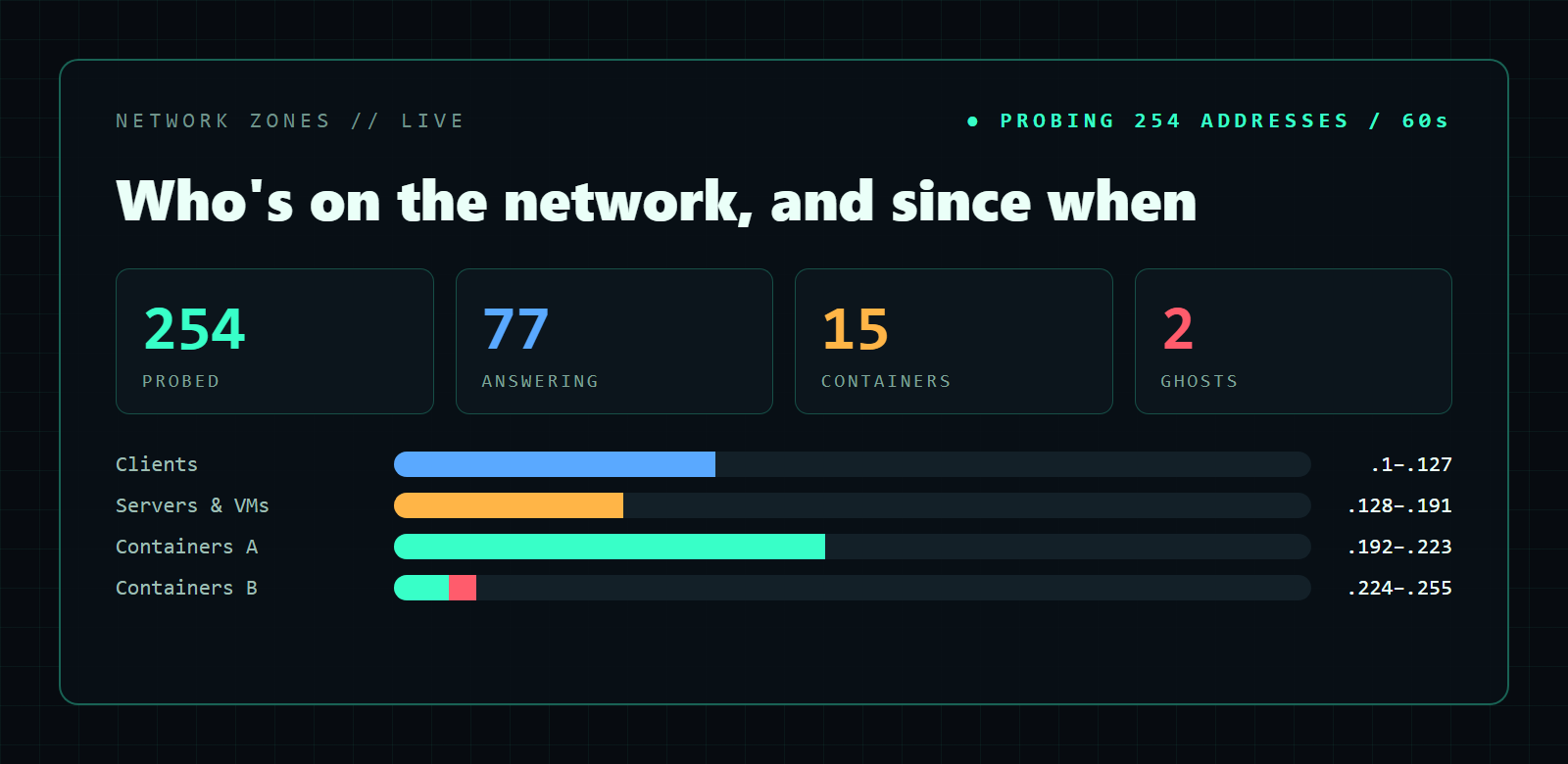
With the real layout confirmed, the address space now has three zones:
- Bottom half: clients and DHCP, from phones and laptops to the older machines with fixed addresses.
- Next quarter: servers and VMs, including the Kubernetes nodes, the security lab and the Proxmox guests.
- Top quarter: Docker containers, split into one block for each NAS.
Each zone has a bookmarked Netdisco report of addresses that have never been seen. That is my free-IP list now, and it gets more trustworthy every day the history grows.
Last seen isn’t alive
History has a catch. The router keeps old ARP entries around, so two containers I had stopped kept showing as “seen recently”. Netdisco answers who has been here. It can’t answer is it up right now. That needed a second pipeline: a Prometheus blackbox exporter, running as one more container, pings every address on the network once a minute, and Prometheus stores the result. On the first run it probed 254 addresses and 77 answered.
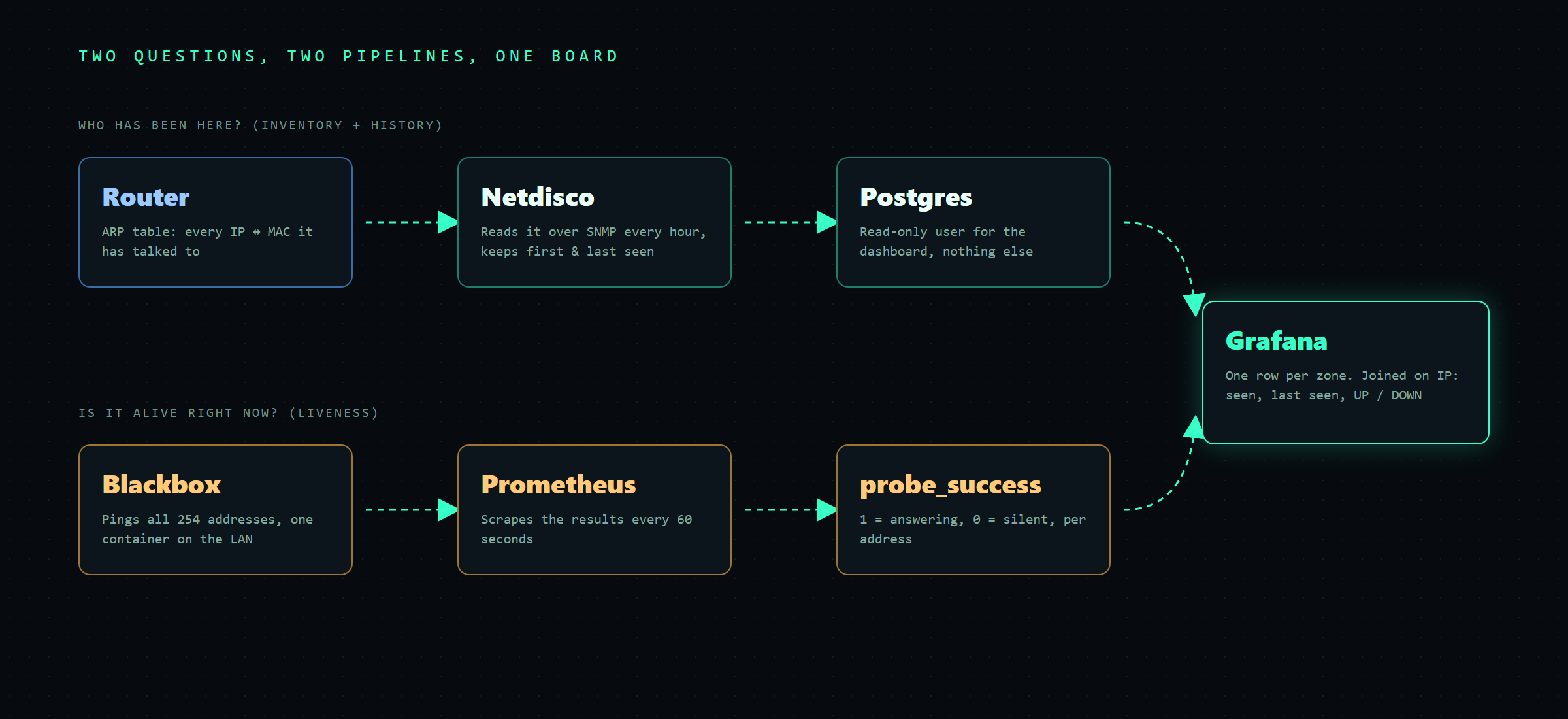
Both pipelines meet in Grafana. Grafana reads Netdisco’s database through a read-only user, gives each zone its own row, and joins the ping results on IP. Each address gets its MAC, first seen, last seen and an UP or DOWN. A ghost is anything the router remembers but nothing answers for.
Honest status
- The dashboard is still being built. The inventory rows work, and the UP/DOWN columns are next.
- A macvlan container can’t reach its own host, so the NAS that runs the pinger shows as DOWN while it’s fine. It’s labelled as “not probeable” and not hidden.
- Hosts that ignore ping read as DOWN. A couple of those will need a TCP check.
- Mapping devices to physical switch ports isn’t done. Most of my switches are unmanaged, so Netdisco can see that a device exists but not which socket it’s plugged into.
- The database is reachable on the LAN with a read-only account. That’s fine for a homelab, but I’ll lock it down further.
Why bother
Every homelab hits the “what was on that address again?” moment. Mine used to end with pinging around and hoping. Now the network writes down who was here and when, and checks every minute who is still here. Picking an address for the next container takes one report instead of a guess.