Follow-up · Completed proof of concept
In Fedora COSMIC Atomic: a desktop with a recovery plan, I described a workstation I intended to build. I called it a worked proposal because that was what it was. The architecture looked reasonable on paper. It still needed to survive a fresh installation.
I have now built it, then reconstructed the environment on a second, clean machine. That test worked. It also changed how I describe the result: much of the reproducibility came from the workstation definition I built around Fedora, rather than from Atomic itself.
The useful outcome is a working proof of concept and a clearer boundary between rebuilding an environment, rolling back an operating system and recovering everything that makes a workstation mine.
What changed since the first article?
The original example started with one administration Toolbx, a GIMP installation and a small local Ansible check. The implementation expanded that idea into a declared environment that a second machine could reconstruct.
| In the proposal | In the completed proof of concept |
|---|---|
| Give each type of software a deliberate home. | Host packages, 12 Flatpaks, four Toolbx environments and a Quadlet service definition. |
| Keep setup notes alongside the example playbook. | A repository with manifests and bootstrap, update and status tooling. |
| Use GIMP as a desktop-app example. | Launch GIMP, then apply the repository’s pinned PhotoGIMP 3.1 configuration script. |
| Rehearse OS rollback and verify backups. | The clean-machine reconstruction is complete. An actual OS regression recovery and data-restore test are not established by this result. |
The machine should not be the only record
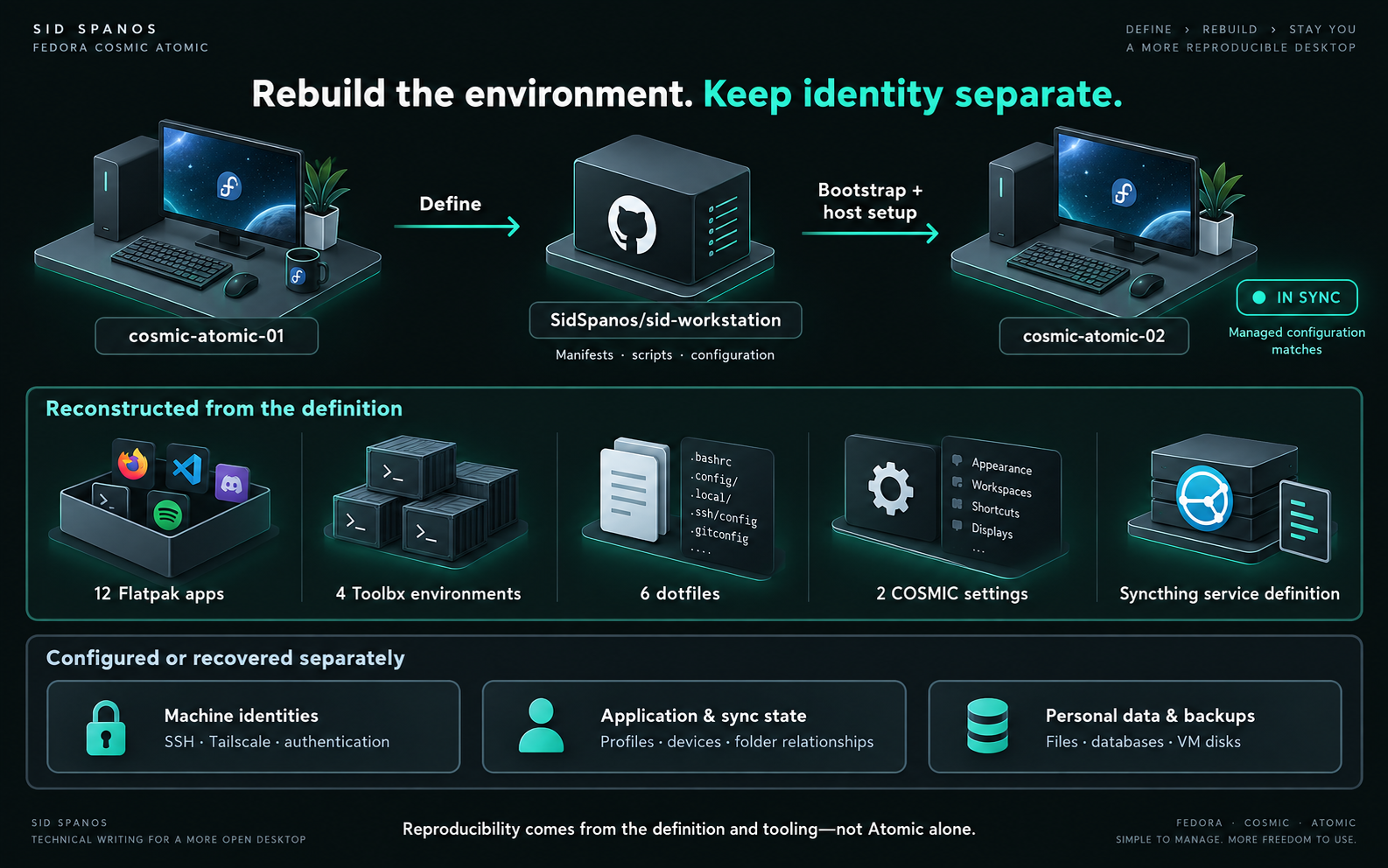
The first machine was cosmic-atomic-01. Alongside it, I developed SidSpanos/sid-workstation: a repository describing the environment I wanted to be able to reconstruct.
It contains bootstrap, update and status tooling, application manifests, Toolbx definitions, command wrappers, managed dotfiles, selected portable COSMIC settings and service definitions. The objective was practical: if the first machine disappeared, I should not have to remember every installation decision and configuration change.
| Layer | Responsibility in this build |
|---|---|
| Fedora COSMIC Atomic | Base operating system and desktop. |
| rpm-ostree | A deliberately selected set of host packages. |
| Flatpak | Desktop applications. |
| Toolbx | CLI, development and administration environments. |
| Podman / Quadlet | Persistent container services. |
| Git repository | The definition and tooling used to reconstruct those managed pieces. |
| Personal and machine state | Data, application state, credentials and identities, handled separately. |
Eventually, the first machine reported:
IN SYNC — machine matches the repository.That was a useful milestone. It was not yet the important test. A definition can match the machine on which it was developed while still depending on undocumented work done along the way.
The test: start with a second clean machine
I installed a fresh Fedora COSMIC Atomic system on a second machine, cosmic-atomic-02. I did not clone the first disk or restore its image. The question was whether the repository could reconstruct the managed environment from a clean desktop.
I configured my Git identity, generated a new SSH key for this physical machine, added its public key to GitHub and verified SSH authentication. Then I cloned the repository and ran:
./bootstrap.shThe new SSH key matters to the story. Reproducing my tools did not require duplicating the first machine’s identity.
Fresh Fedora COSMIC Atomic installation
                  │
                  ▼
New machine identity + repository checkout
                  │
                  ▼
             bootstrap.sh
                  │
                  ▼
Apps · Toolbx · wrappers · config · service definition
                  │
                  ▼
       status.sh → outstanding items
                  │
                  ▼
Host packages + hostname → OS deployment reboot
                  │
                  ▼
               IN SYNC

Separate operational setup:
authentication · network membership · service activation

Separate recovery responsibility:
user data · application state · backupsWhat bootstrap actually reconstructed
| Managed item | Result on the clean machine |
|---|---|
| Flatpak applications | All 12 declared applications. |
| Toolbx environments | All four: sid-workstation, sid-network, sid-security and sid-infrastructure. |
| Command wrappers | 17 of 20 installed. dig, mtr and whois were deliberately skipped because host versions already existed. |
| Managed dotfiles | All six. |
| Portable COSMIC settings | Both managed settings. |
| Persistent service definition | The Syncthing Quadlet definition. |
The wrapper result was not three unexplained failures. The existing host commands were the reason for those skips. That distinction is more useful than presenting a percentage without explaining what it measures.
At that point, status.sh identified eight outstanding items: seven host packages and the hostname. The host packages were:
tailscale
libvirt-daemon-kvm
libvirt-client
libvirt-daemon-config-network
virt-install
virt-manager
edk2-ovmf
These were installed using rpm-ostree, with a reboot into the new deployment. With the host requirements and hostname addressed, the second machine reported:
./status.sh
IN SYNC — machine matches the repository.
That is the central result: a fresh second workstation matched the managed definition without being cloned from the first.
Matching the repository was not the end of setup
There was still operational work to do. Claude Code was installed in userspace and authenticated. I enabled tailscaled and joined the second machine to the same tailnet as the first.
For virtualisation, I enabled Fedora 44’s split libvirt sockets, established the local libvirt group correctly from Fedora’s vendor group definition and added user sid to that group. The package list alone had not completed that integration.
I started Syncthing’s rootless Quadlet service and enabled user lingering. I also launched GIMP once before applying the repository’s pinned PhotoGIMP 3.1 configuration script. After removing temporary deployment and test files, the final status check was again in sync.
“In sync” has a specific scope: the machine matches what the repository’s checks manage. It is not a claim that every application workflow has been tested, every account restored or every possible recovery scenario exercised.
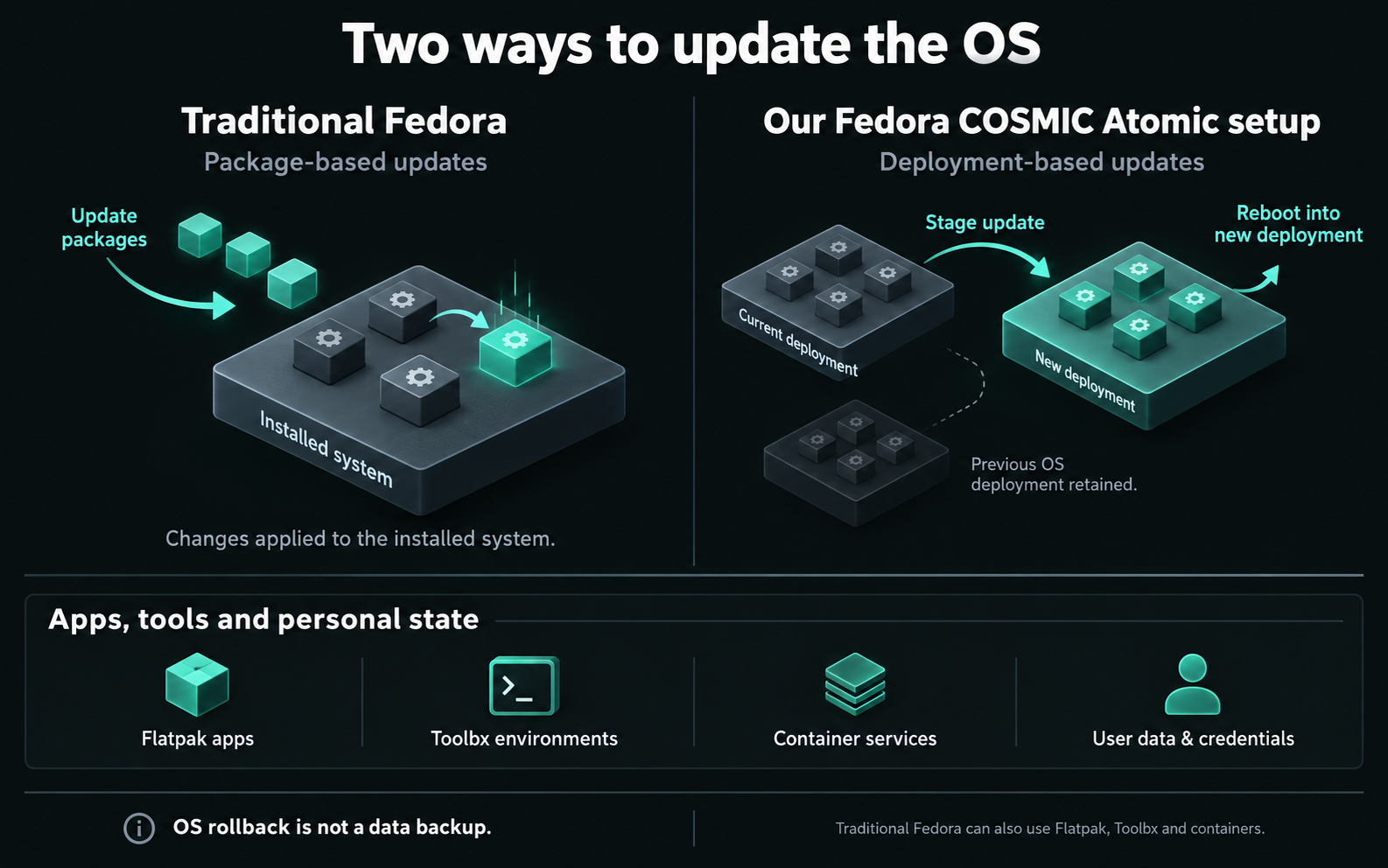
What belonged to Atomic, and what belonged to the tooling?
During the build, I became less comfortable attributing the entire result to Atomic. The reproducibility mostly came from Git, manifests, scripts, containers and configuration management. Those are things I deliberately assembled.
A similar definition could be built for conventional Fedora, Ubuntu, Debian or Arch. The implementations would differ, but keeping the desired environment outside the machine is not an Atomic-only capability.
Atomic contributed a different set of properties: transactional OS deployments, previous deployments to boot into, controlled operating-system areas and a clear point at which host changes take effect. It also encouraged me to keep the host small and think carefully about where software belonged.
The separation between host packages, desktop applications, tool environments and persistent services was useful. Much of that separation is also available on a conventional Linux desktop. The clean-machine test demonstrated that this particular design worked; it did not establish that Atomic was superior to those alternatives.
Rollback is a narrower recovery tool than the name suggests
The strongest rollback use case, to me, is a short-term OS regression: yesterday’s update broke graphics, networking or boot, so I boot the previous deployment.
That is valuable. It is also different from putting the entire workstation back to yesterday.
An earlier OS deployment does not itself restore home-directory data, application or Flatpak state, credentials, databases or VM disks. It cannot rewind an external service’s API. Persistent state continues changing independently of the deployment I choose at boot.
For that reason, I am skeptical of treating a months-old OS deployment as a complete workstation recovery point. The operating system might be older while almost everything it interacts with has moved on.
This experiment tested reconstruction on a clean installation. It did not test recovery from an actual broken OS update, or prove that a backup could restore my personal data. Those remain different tests.
Provisioning, synchronisation and backup are different jobs
Syncthing made the distinction particularly clear. The repository recreated its service definition. It deliberately did not recreate its identity, device relationships, GUI credentials or folder relationships.
The same boundary applied to GitHub SSH identity, Claude authentication and Tailscale machine identity. Those remained outside the workstation definition. I want a repeatable environment, not a repository that silently duplicates every credential and machine identity.
| Job | Question it answers |
|---|---|
| Provisioning | Can I reconstruct the tools and managed configuration? |
| Synchronisation | Which current working files should be shared between systems? |
| Backup and restore | Can I recover data or earlier state after loss or damage? |
| OS rollback | Can a previous operating-system deployment get me past an OS regression? |
Success in one row does not establish success in the others. My proof of concept answered the provisioning question for the managed scope.
The complexity was part of the result
This was not particularly simple to design. Each piece of software raised a placement question: does it need to live on the host, work as a Flatpak, belong in Toolbx or run as a persistent Podman service?
There were real implementation issues: wrapper recursion, host integration, Fedora 44’s split libvirt daemon architecture, rpm-ostree reboot boundaries and deciding which configuration was portable rather than personal state.
Those decisions are now represented in the definition and tooling instead of existing only in my memory. That is useful work, but it is still work. A successful bootstrap on the second machine should not hide the effort required to make that bootstrap possible.
Where I would actually use this
The most convincing use case for me is a controlled technician or engineering workstation. Keep the host deliberately limited, then retrieve the toolkit needed for the job.
For example, a network task can use the network environment, infrastructure administration can use the infrastructure environment, and security work can use its own toolkit. Those environments can be reconstructed without permanently accumulating every tool and dependency on the host. My four Toolbx definitions give that idea a concrete starting point.
Again, that capability does not require Atomic. Atomic is one possible foundation for it.
For an office laptop and a road laptop belonging to one person, I would first ask what actually needs sharing. Cloud storage might handle shared working files more simply than direct machine-to-machine synchronisation. Tailscale earns its place when a private service or resource needs to be reachable. Syncthing earns its place when there is a real folder-synchronisation requirement.
Installing both because I can is not a use case.
What I can now claim
I proposed a workstation architecture, built it on cosmic-atomic-01, then used its definition to reconstruct the managed environment on a clean cosmic-atomic-02. The final repository check passed. The environment was rebuilt rather than copied from a disk image.
I have not established a performance advantage, measured a recovery-time improvement or demonstrated complete disaster recovery. I also have not shown that a conventional Fedora system could not achieve the same provisioning result.
What I have gained is a workstation definition I can test, a clearer account of the operational steps that remain separate, and fewer assumptions about what rollback actually protects.
The next useful tests are therefore specific: exercise an OS regression recovery, verify a restore of important data and application state, and decide which cross-machine services solve a real daily problem. The clean-machine proof is complete. Those wider recovery claims still have to be earned.